
How Immutable Calculation Runs Create a Payout Audit Trail
A product-led guide to building payout evidence with immutable calculation runs instead of spreadsheet screenshots.
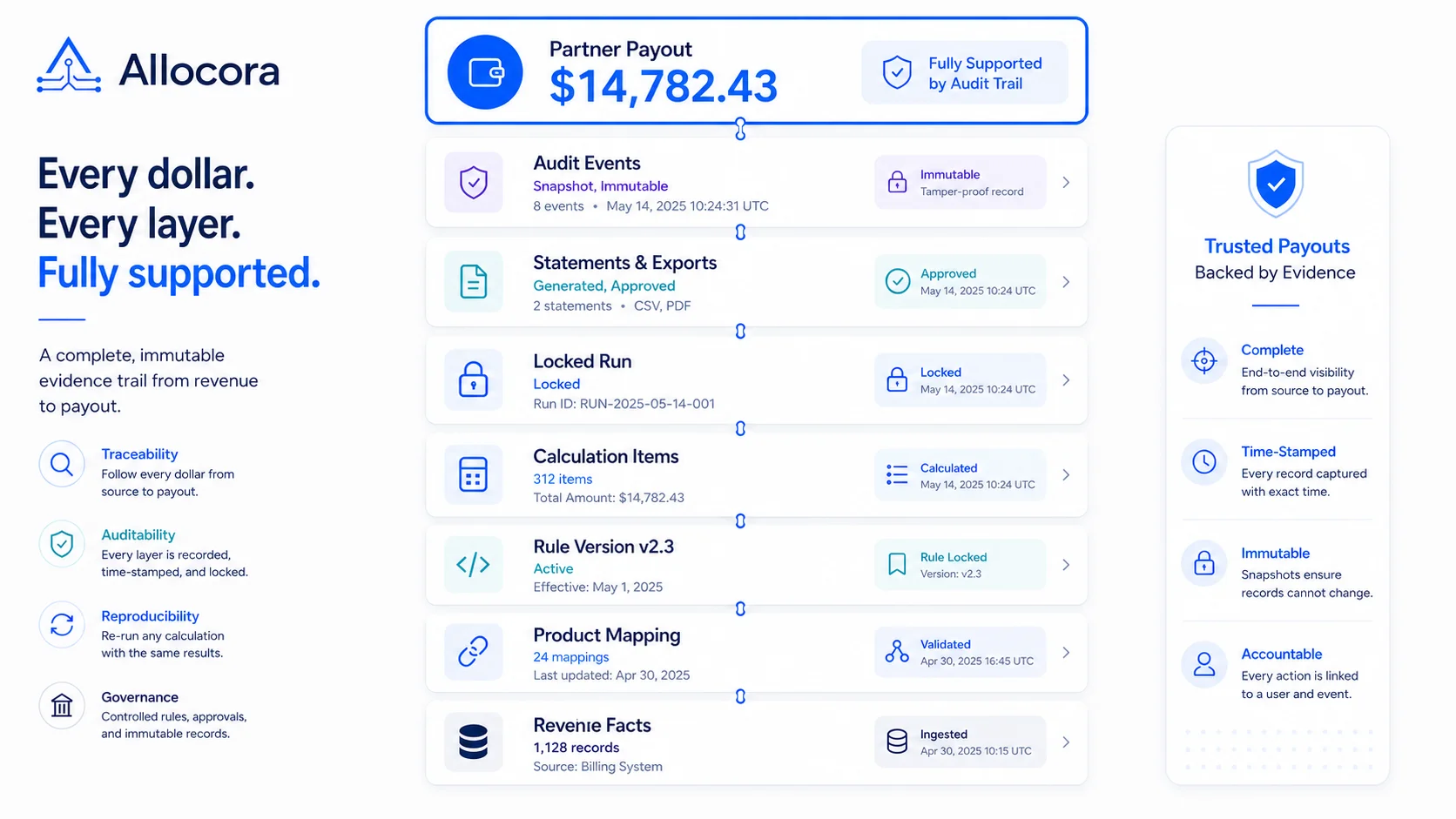
A payout audit trail should answer one question: how did this amount get calculated? The answer should not be a screenshot, a Slack thread, or a spreadsheet copy. It should be a structured record that connects source revenue, payees, product mappings, rule versions, calculation outputs, statements, exports, and workflow events.
Allocora is designed around this idea. It calculates and governs payouts, producing deterministic runs, immutable snapshots, structured exports, and audit-ready evidence. It does not move money. It gives teams the proof they need before the payout rail or finance process executes payment.
This article explains how immutable calculation runs create a stronger payout audit trail.
A final payout number is not an audit trail
The final payout number is the output. An audit trail is the context behind that output.
A useful payout audit trail should show:
- Which revenue rows were included.
- Which source produced them.
- Which products or external identifiers were mapped.
- Which payee was eligible.
- Which rule version matched.
- Which tie-break decision applied.
- Which allocation amount was produced.
- Which run generated the result.
- Which statement or export was created.
- Which user actions changed relevant records.
If a team cannot answer those questions without rebuilding a workbook, it does not have a durable audit trail.
Allocora's current implementation covers the key workflow objects: revenue sources, integrations, revenue rows, product mappings, payees, rules, calculation runs, calculation items, statements, exports, and audit logs.
Immutable revenue facts are the base layer
Audit trails start with source data. If source revenue rows can be overwritten or silently deleted, every downstream calculation is weaker.
Allocora stores canonical revenues as append-only facts. Stripe ingestion uses idempotent keys and does not overwrite existing revenue rows. CSV/XLS/XLSX imports write canonical revenues through a preview and confirm flow. Manual entries create immutable revenue rows. Refunds and adjustments are represented explicitly rather than hidden inside modified sales rows.
The business logic documentation confirms that revenues are immutable financial facts, guarded against update and delete at the model level.
For payout audit trails, this matters because the source row should remain stable after it has been used in a calculation. If the source changes, the team should create a new fact or adjustment rather than rewrite history.
Versioned rules preserve the logic used at the time
Audit trails also require stable rule history. Partner terms, seller fees, and revenue-share agreements change. The system should preserve which version applied to a past run.
Allocora uses immutable rule versions. Creating, updating, toggling, or changing priority creates new versions. Supported allocation types include flat and tiered allocations, and rules can use metadata conditions. Rule conflict detection can block ambiguous active rules in the selected calculation scope.
This makes the audit trail more precise:
- A payout line can reference a specific rule version.
- Historical runs keep the logic used at the time.
- Current rule changes do not rewrite prior outputs.
- Finance can review rule changes before close.
Without versioned rules, a payout audit trail can only say what the rule looks like now, not what it was when the run was created.
Deterministic runs make the evidence repeatable
Allocora's marketing language emphasizes deterministic calculation runs: the same inputs produce the same outputs. Determinism is a practical audit feature.
If a calculation is deterministic, reviewers can trust that the output is not affected by hidden randomness or formula drift. The run becomes a reproducible artifact. The system can store snapshot metadata such as active rule versions, mapping snapshot hash, revenue query hash, and combined snapshot hash.
That is different from a spreadsheet. A spreadsheet may have hidden dependencies, copied formulas, and manual edits after close. Even if the workbook is saved, the team may not know whether it represents the exact state used for payout review.
This is one of the reasons teams eventually outgrow spreadsheets. We explored those warning signs in Replace Spreadsheet Commission Tracking Before Month-End Breaks.
Immutable calculation runs reduce that ambiguity.
Before a run becomes part of the audit record, teams should validate the underlying logic. We covered that process in Rule Simulation for Payout Calculations Before Close.
Calculation items connect rules to payees
The evidence should be available at the line-item level. It should not only show that a partner earned $12,400. It should show the rows and rules that produced that amount.
Allocora persists calculation items with explanation payloads. Rule simulation and the calculation engine share the rule evaluation service, so the logic used for previews and final runs remains aligned. Calculation item exports can provide detailed records for finance and audit workflows.
This helps teams answer:
- Why did this payee receive this amount?
- Which rule matched?
- Was the allocation flat or tiered?
- Was there retained remainder?
- Was a metadata condition involved?
- Did a refund or adjustment affect the total?
The stronger the line-level evidence, the easier it is to handle partner questions.
Locks and approvals create a review boundary
Audit trails need a boundary between "being prepared" and "ready to use." Allocora's implemented run lifecycle supports status transitions, review, approvals, locks, unlocks, and audit logging for relevant status changes.
A locked run is especially important because statement generation depends on locked calculation runs. That creates a clean sequence:
- Prepare input data.
- Simulate and review rules.
- Run the calculation.
- Review outputs.
- Lock the run.
- Generate statements and exports.
- Use the outputs in downstream finance or payout workflows.
This boundary helps prevent statement artifacts from being generated from unstable data.
This review process is also a key part of partner commission tracking with audit trails.
Comparison context strengthens review
Reviewers also need context from prior runs. Allocora's current functionality includes calculation run review payloads with prior comparable run context when available, deterministic run-change summaries, and contract references from rule versions used in the run.
That helps reviewers move beyond "is this total high or low?" They can inspect what changed: amount deltas, rule-version membership, payee membership, and mapping snapshot changes. Those signals are useful during close because payout changes are not always errors. Sometimes they reflect a new rule, a new payee, a product mapping update, or a real revenue shift.
Reviewers should be able to inspect those differences before the team exports statements.
Statements and exports should be tied to the run
The evidence chain breaks down if statements and exports are detached from the calculation. If a statement is manually edited after a run, the partner-facing output may not match the reviewed data.
Allocora generates statements from locked runs. Statement content uses snapshot-safe data from calculation items. Exports are generated through queued workflows and audit logging. The current functionality includes payee statements, batch ZIPs, structured CSV/XLS/XLSX exports, and auditor bundles.
For audit purposes, this means:
- The statement can be traced to a run.
- The export can be traced to a run.
- The run can be traced to source data and rules.
- The workflow events can be traced through audit logs.
That chain is stronger than manually assembled files.
Audit logs should cover change events
Allocora's audit coverage includes payees, rules, products and mappings, revenue sources, revenue imports, calculation lifecycle, exports, integrations, and user profile updates. That matters because payout outcomes depend on all of those objects.
Examples of audit-relevant events include:
- A Stripe integration credential is saved or rotated.
- A revenue source sync changes status.
- A CSV import is confirmed.
- A product mapping is remapped.
- A payee version is created.
- A rule version changes priority.
- A calculation run is locked.
- An export is generated.
Teams need visibility into not only the final output, but also the changes that shaped it.
What a useful payout audit trail looks like
For a partner payout, the team should be able to assemble this story:
- Revenue came from a named source.
- Rows were imported or synced on a known schedule.
- Product mappings were resolved before the run.
- The payee had an active version.
- A specific rule version matched.
- The run used a snapshot of rules and mapping state.
- The calculation item preserved the allocation explanation.
- The run was reviewed and locked.
- Statements and exports were generated from that locked run.
- Audit logs show relevant changes and output generation.
That is an audit trail.
More importantly, it means the team can explain a payout months later without rebuilding the calculation.
Keep the audit package practical
An audit trail should be complete, but it should also be usable. Finance teams do not need a scattered collection of exports that require another spreadsheet to interpret. They need a practical package that answers the likely review questions quickly.
A useful payout evidence package can include the locked run, payee totals, calculation item detail, statement PDFs, an export file, and a short audit excerpt for relevant changes. Allocora's current export and statement workflows support this direction by tying outputs back to calculation runs and preserving audit events around important workflow actions.
The practical test is simple: if a partner asks about a payout two months later, the team should be able to open one run and follow the evidence without rebuilding the calculation.
Launch takeaway
Immutable calculation runs create payout audit trails by preserving the context behind each amount. The strongest workflow starts with immutable revenue facts, applies versioned rules, runs deterministic calculations, locks reviewed outputs, and generates statements and exports from the same run.
Allocora is built for teams that need this evidence before money moves.
Related Articles
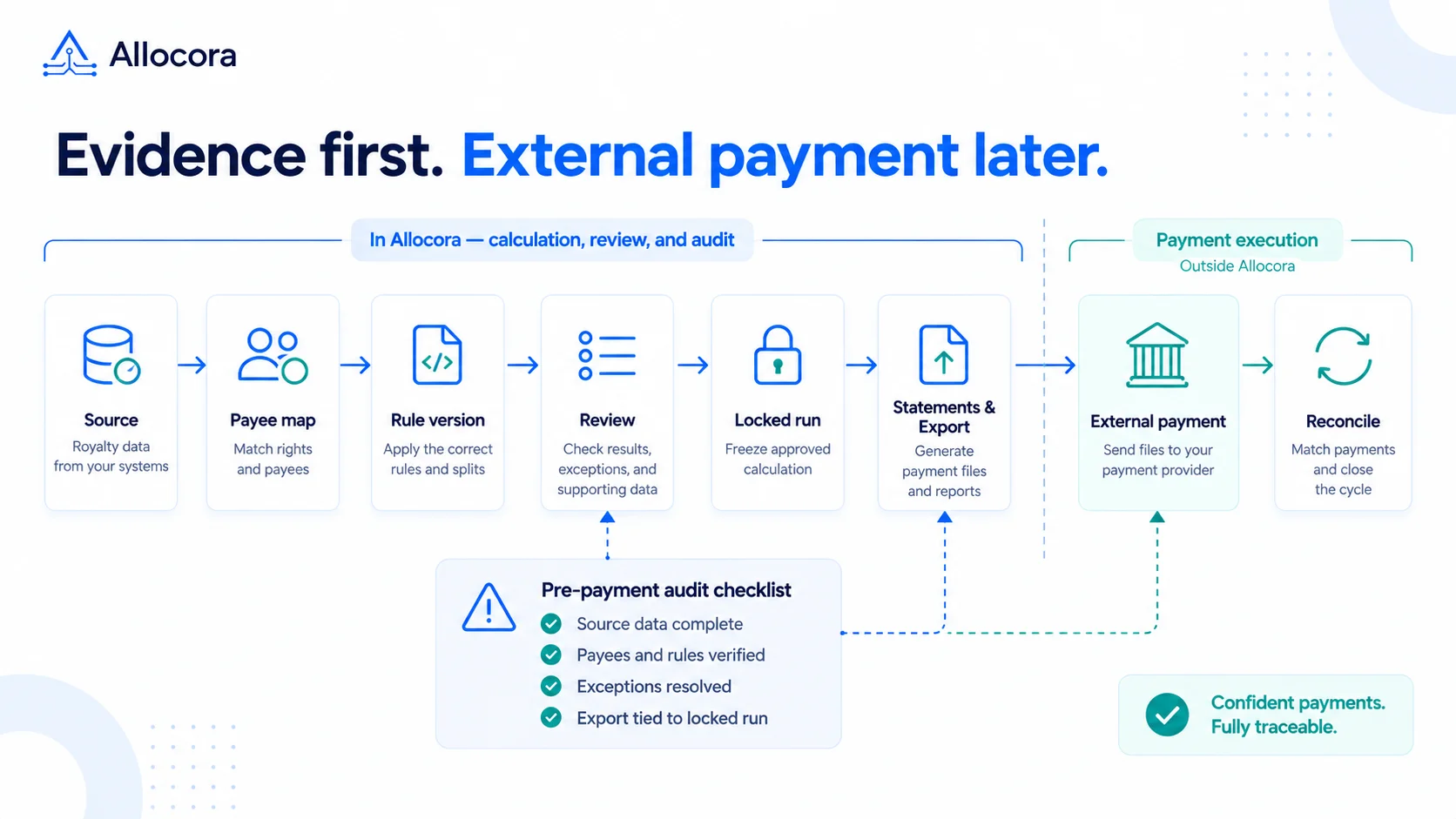 Payout Audit Checklist: What to Review Before External Payments
A payout audit checklist for reviewing source data, mappings, rules, locked runs, statements, exports, and reconciliation before external payments.
Sep 16, 2026 - 7 min read
Payout Audit Checklist: What to Review Before External Payments
A payout audit checklist for reviewing source data, mappings, rules, locked runs, statements, exports, and reconciliation before external payments.
Sep 16, 2026 - 7 min read
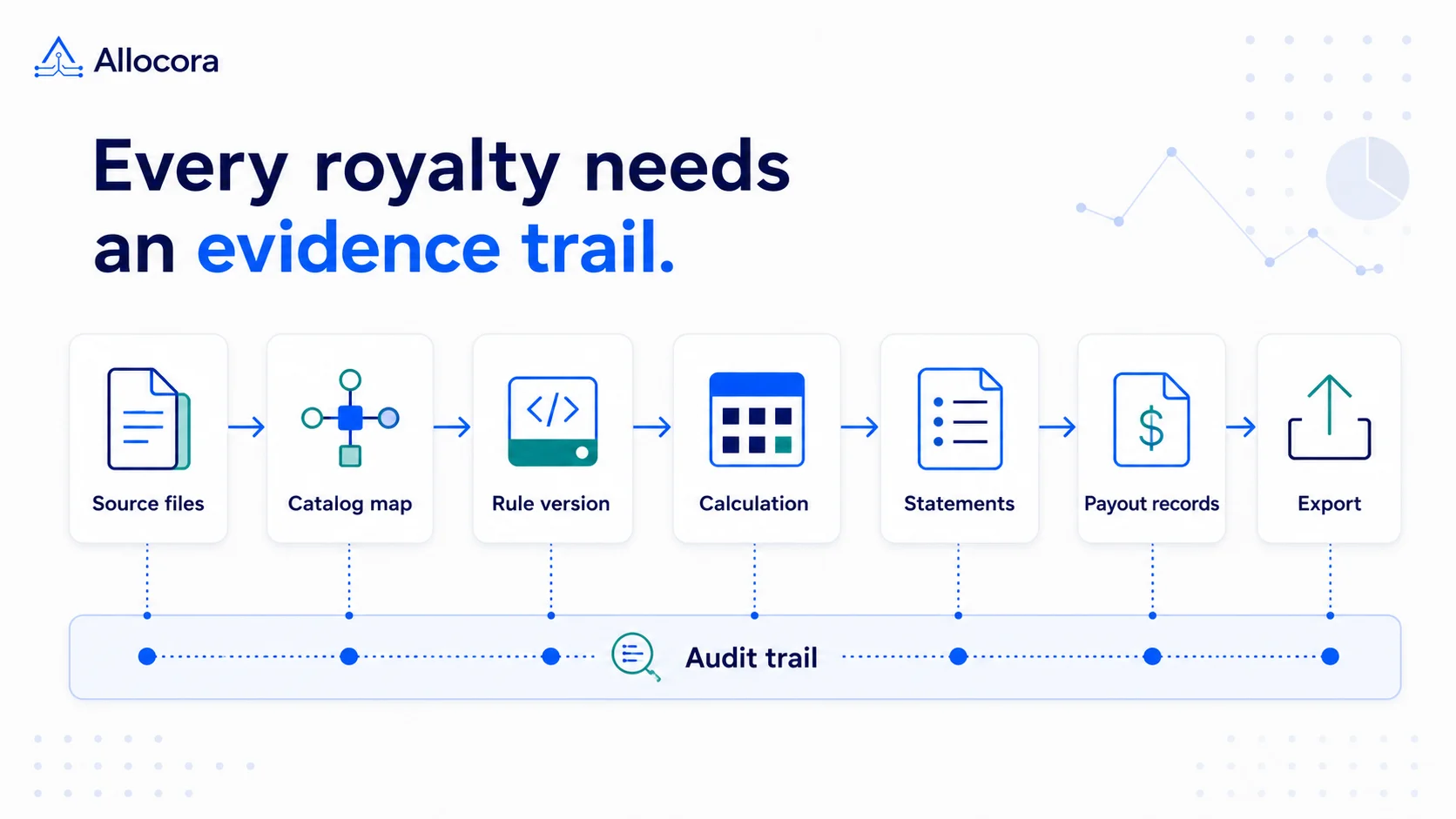 Royalty Audit Checklist: 10 Steps to Prepare Statements, Evidence, and Payout Records
A step-by-step royalty audit checklist for preparing source revenue, contract rules, statements, payout exports, and reconciliation evidence.
Aug 25, 2026 - 8 min read
Royalty Audit Checklist: 10 Steps to Prepare Statements, Evidence, and Payout Records
A step-by-step royalty audit checklist for preparing source revenue, contract rules, statements, payout exports, and reconciliation evidence.
Aug 25, 2026 - 8 min read
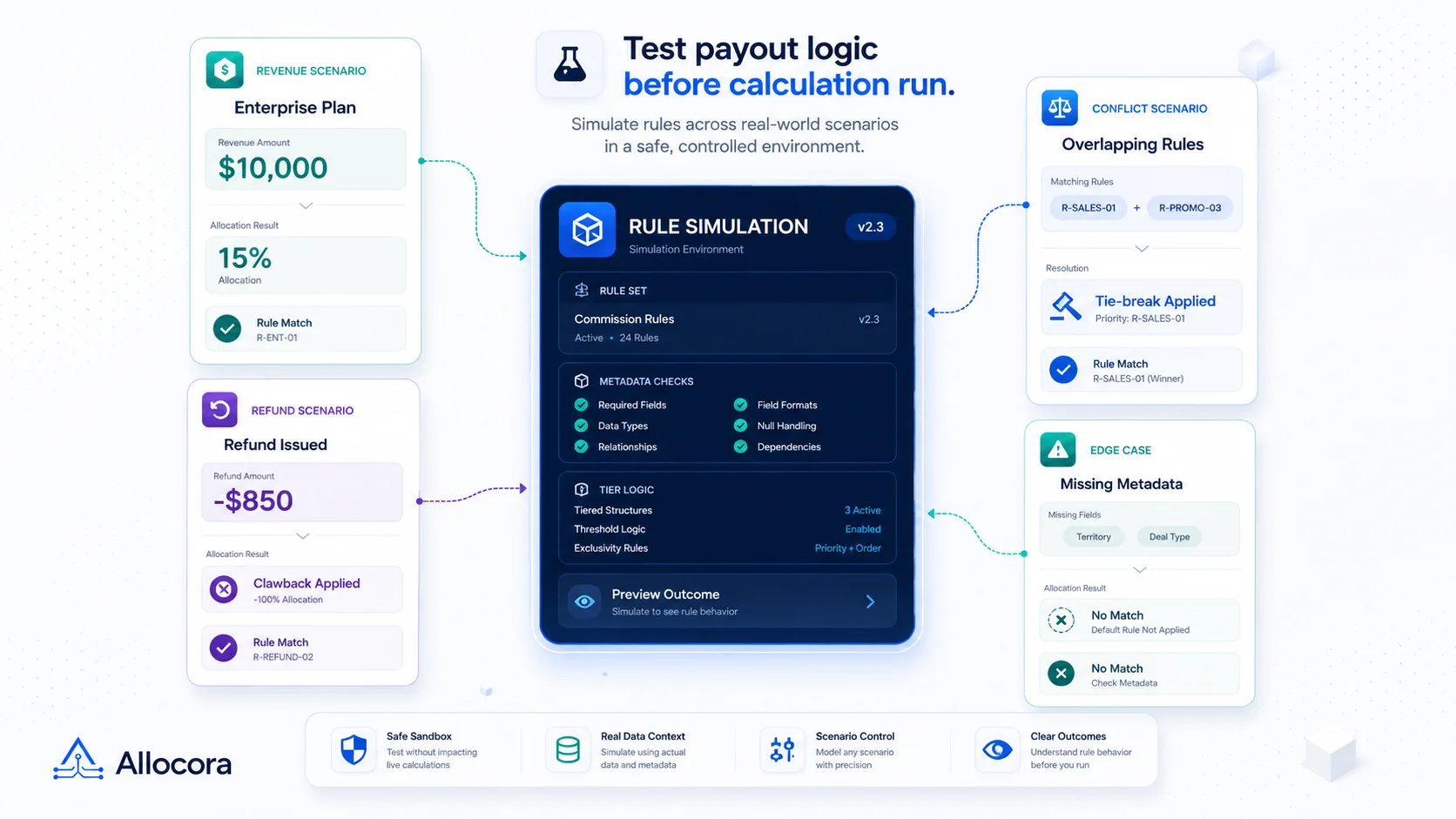 Rule Simulation for Payout Calculations Before Close
A practical product-led article explaining why payout teams should simulate commission and allocation rules before creating final runs.
Jun 23, 2026 - 8 min read
Rule Simulation for Payout Calculations Before Close
A practical product-led article explaining why payout teams should simulate commission and allocation rules before creating final runs.
Jun 23, 2026 - 8 min read