
Rule Simulation for Payout Calculations Before Close
A practical product-led article explaining why payout teams should simulate commission and allocation rules before creating final runs.
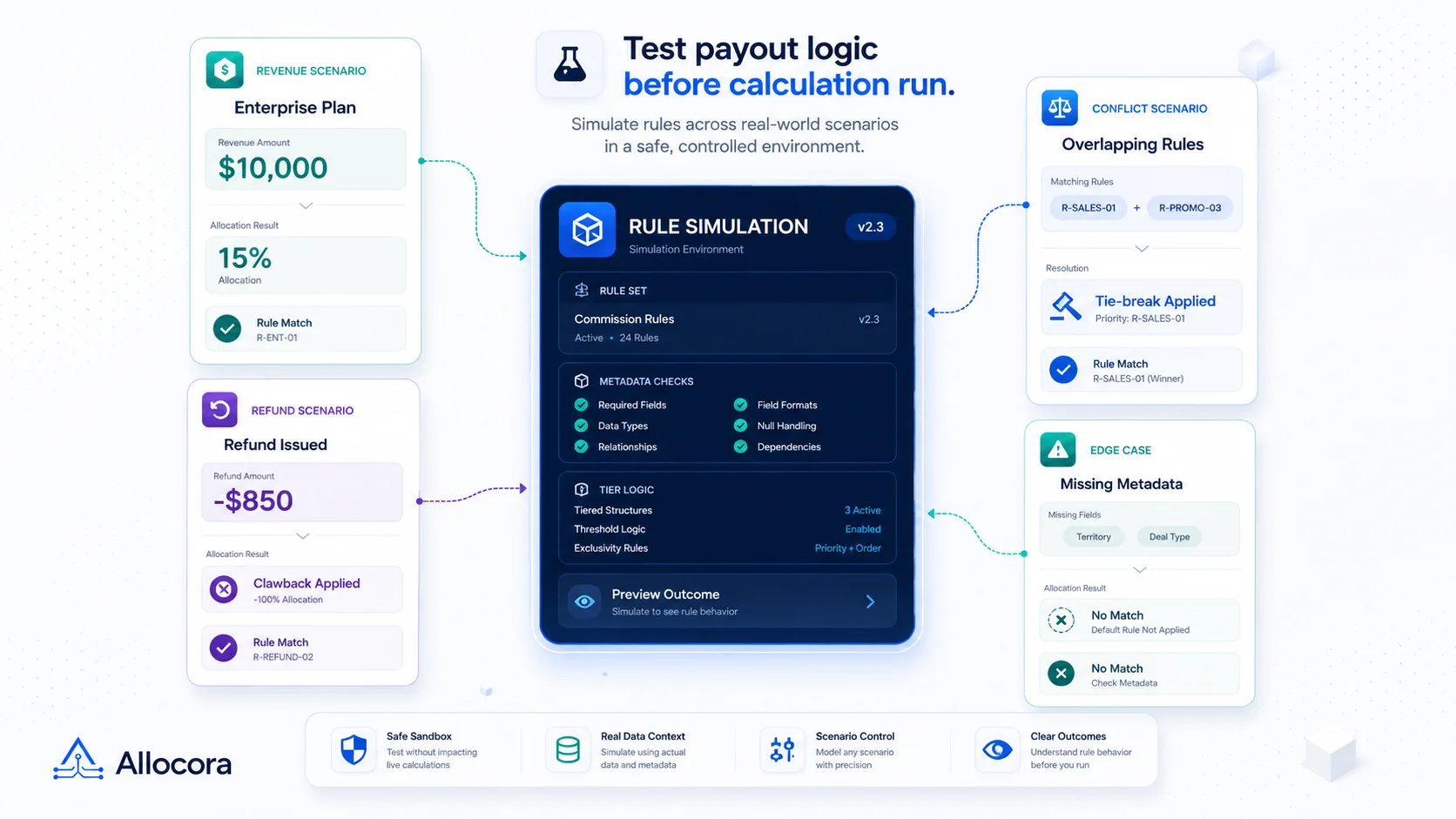
Rule simulation is the review step that catches payout logic problems before a calculation becomes a close artifact. It lets operators preview which rules match, how payees are allocated, why a tie-break decision occurred, and whether conditions behave as expected.
For payout workflows, this matters because rules are rarely static. Affiliate rates change. Seller fee structures vary. Revenue-share agreements update. Product mappings evolve. Refunds and adjustments enter the period. A team that waits until the final run to discover a rule issue has already made close harder.
Allocora includes rule simulation as part of its governed payout calculation workflow. It uses the same Rule Evaluator service as the calculation engine, returning matched rule versions, tie-break reasoning, per-payee allocation math, metadata condition traces, and explanation payloads.
This article explains why simulation should happen before every payout close.
Payout rules are business logic
A payout rule is not just a rate. It is business logic that determines who gets paid from which revenue.
A rule may consider:
- Date validity.
- Revenue source.
- Product.
- Territory.
- Metadata conditions.
- Payee.
- Allocation type.
- Priority.
- Effective date.
- Tier thresholds.
When these variables interact, the final payout can be correct only if the rule match is correct. Operators can inspect the logic while it is still cheap to adjust.
This is especially important when replacing spreadsheets. We covered the warning signs in Replace Spreadsheet Commission Tracking Before Month-End Breaks.
In a spreadsheet, rule simulation often happens informally through manual row checks.
Simulation and calculation should use the same logic
A simulation tool is only useful if it reflects the real calculation logic. If preview and final run use different logic, the preview can create false confidence.
Allocora's confirmed implementation uses the shared Rule Evaluator service for both rule simulation and the calculation engine. This means simulation is a front-door view into the same matching behavior used later in runs.
The current simulation output includes:
- Applied rules.
- Payee allocations.
- Tier breakdowns for tiered rules.
- Metadata predicate explanation details.
- Retained remainder.
- Textual explanation trace.
That makes simulation a review artifact, not a separate calculator.
The same idea appears in our guide to partner commission tracking with audit trails, where calculation evidence matters as much as the final payout amount.
Use simulation when adding or changing rules
Any rule change should be simulated before close. Common triggers include:
- A new affiliate partner joins.
- A seller moves into a new fee tier.
- A revenue-share percentage changes.
- A product-specific rule is added.
- A metadata condition is introduced.
- A priority value changes.
- A rule's effective window changes.
This review process helps confirm the rule matches the intended revenue rows and payees. It also helps catch unintended matches, such as a product-specific rule applying more broadly than expected.
For teams with recurring close workflows, this should be part of the rule change process:
- Create or update the rule.
- Simulate representative revenue.
- Review matched rule versions.
- Confirm allocation math.
- Inspect metadata condition traces.
- Adjust priority or scope if needed.
- Run the close calculation after review.
This is safer than editing a rule and hoping the final run reveals no issues.
Why rule conflicts need explanation
Payout rules can overlap. A payee may be eligible under more than one rule. A product rule may overlap with a broader revenue source rule. A metadata condition may narrow the match, but not enough to make the result obvious.
Allocora resolves selected rules using specificity, priority, and valid-from date. Conflict detection blocks ambiguous active rules when they overlap in ways that cannot be resolved safely. The preview exposes tie-break reasoning so operators can understand why one rule won.
This is useful because payout disputes often come from expectation gaps:
- "Why did this product use the lower rate?"
- "Why did this partner not receive the tiered rule?"
- "Why did the new rule not apply to this period?"
- "Why did a fallback apply?"
Simulation helps answer those questions before statements are generated.
Metadata conditions need visible traces
Modern payout rules often depend on metadata. For example, revenue may carry campaign identifiers, product attributes, customer segments, or source-specific fields. A rule may apply only when a metadata value matches a condition.
Allocora supports structured metadata conditions and returns predicate traces during simulation. The business logic documentation confirms that revenue metadata takes precedence over product metadata when merged for rule evaluation.
Visible traces matter because metadata issues are hard to spot in final totals. A rule may fail because a field is missing, a value is different than expected, or a condition is too narrow.
A useful preview should show:
- Field name.
- Operator.
- Expected value.
- Actual value.
- Pass or fail result.
That is the level of detail teams need before close.
Catch payout surprises before statements are generated
Statements should not be the first place a rule issue appears. If a partner statement shows a surprising payout amount, the team has to pause distribution and investigate. That slows close and weakens trust.
Because Allocora generates statements from locked calculation runs, the best time to catch rule issues is before the run is locked. Simulation gives operators a way to preview the logic while it is still cheap to adjust.
This protects:
- Partner statements.
- Seller statements.
- Close packages.
- Payout-ready exports.
- Internal finance review.
The goal is to keep final outputs boring. Simulation makes that more likely.
Teams evaluating payout workflows should also understand the distinction between payout rails and payout calculation software, since simulation belongs on the calculation side of the process.
Validate payout logic before using real data
New workspaces often start with sample data, a preset, or a migrated spreadsheet workflow. Allocora includes onboarding presets for SaaS affiliate payouts and marketplace seller payouts, and those presets create sample sources, mapped products, payees, rules, revenues, and a completed calculation run.
During onboarding, users can see how rule logic behaves before real close work depends on it. A team can compare the simulated result with the calculation run output, inspect why a payee matched, and build confidence that rules are configured correctly.
Surface edge cases before close
The highest-risk payout mistakes often happen outside the happy path. A refund row may have the wrong sign. A product may be unmapped. A metadata value may be missing. A rule may overlap with another rule. A tier may not cover the expected range.
This review step helps expose these issues while the team is still editing logic. It cannot replace import validation or conflict detection, but it gives operators a practical way to inspect representative cases before a formal run.
That review habit is especially useful when multiple people own payout logic. Operations may configure source mappings, finance may review totals, and leadership may approve a close package. Simulation gives the group a shared explanation of expected rule behavior.
Decide who owns simulation review
Simulation works best when ownership is clear. Operations can prepare representative rows and confirm that mappings are present. Finance can review allocation math and retained remainder. A team lead can verify that the rule behavior matches the agreement or internal policy. The point is not to add bureaucracy. The point is to make sure rule changes are tested by the people who understand the consequences.
For a recurring close, this review can be lightweight: simulate the changed rules, record any exceptions, then create the calculation run after the expected behavior is clear.
Simulation does not replace calculation runs
Simulation is a preview. It should not become the record of close. The calculation run remains the formal artifact with snapshots, persisted items, status, and exports.
Use simulation to answer "what should happen if this rule applies?" Use calculation runs to answer "what did we calculate for this period?"
Allocora supports both:
- Simulation for rule review.
- Calculation runs for persisted payout results.
- Locks and approvals for reviewed close state.
- Statements and exports from locked or completed run data as implemented.
This separation keeps exploratory review distinct from official output.
A practical simulation checklist
Before each payout close, simulate:
- A typical revenue row for each major product.
- A row for each active revenue source.
- A row for each new or changed payee.
- A refund or adjustment scenario when relevant.
- A row expected to match each tier.
- A row expected not to match a special condition.
- A row with missing or unexpected metadata.
- A prior-period example after rule changes.
- A high-value transaction that affects material payout totals.
- A representative row for each marketplace, affiliate, or agency workflow.
This checklist turns simulation into a close control rather than a troubleshooting tool.
Teams working with multi-party allocations may also find the Revenue Split Automation use case helpful.
Launch takeaway
Rule simulation belongs before every payout close because payout rules are business logic. Teams should preview matches, allocation math, tie-break reasoning, and metadata traces before creating final runs and statements.
Allocora's simulation uses the same rule evaluation service as the calculation engine, making it a practical review surface for recurring payout workflows.
Teams that already know their payout rules are complex can use simulation as the bridge between education and self-serve exploration. It gives them a way to test real logic before committing to a close process.
Related Articles
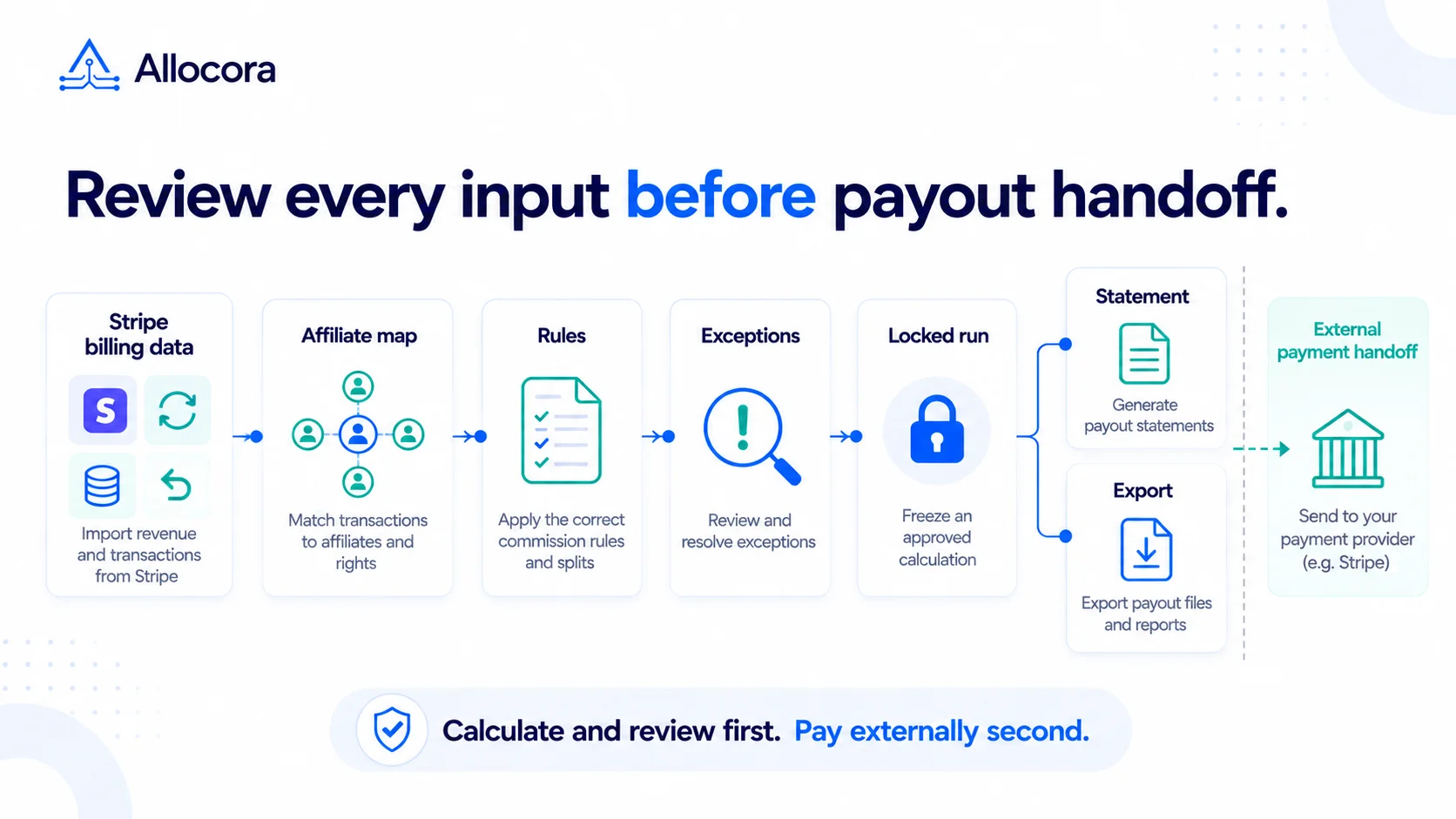 Stripe Revenue-to-Affiliate Payout Close Checklist
Review Stripe revenue for affiliate commission close: choose the ingestion path and date policy, verify mappings and corrections, lock the calculation, and prepare the external payment handoff.
Sep 24, 2026 - 6 min read
Stripe Revenue-to-Affiliate Payout Close Checklist
Review Stripe revenue for affiliate commission close: choose the ingestion path and date policy, verify mappings and corrections, lock the calculation, and prepare the external payment handoff.
Sep 24, 2026 - 6 min read
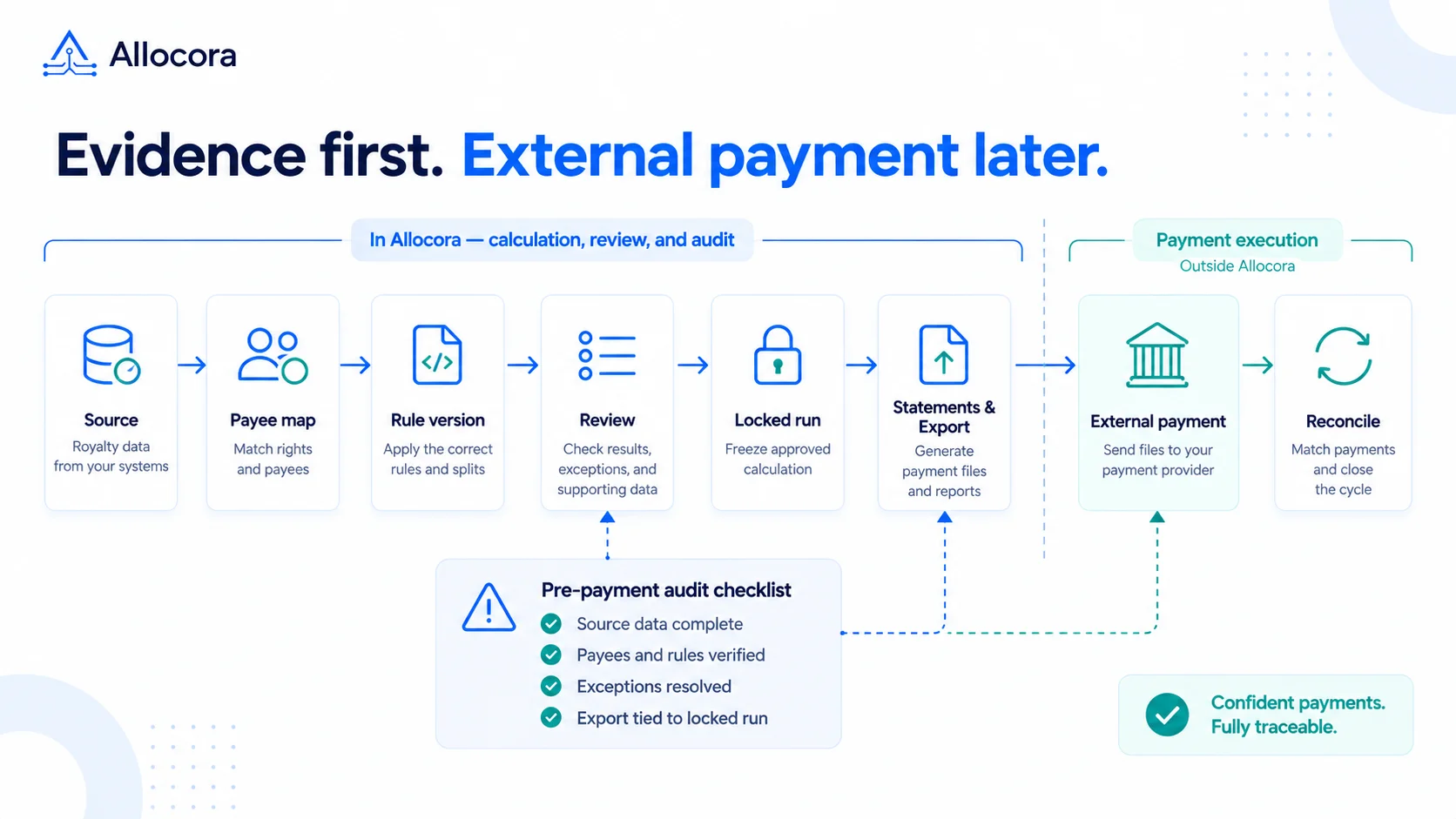 Payout Audit Checklist: What to Review Before External Payments
A payout audit checklist for reviewing source data, mappings, rules, locked runs, statements, exports, and reconciliation before external payments.
Sep 16, 2026 - 7 min read
Payout Audit Checklist: What to Review Before External Payments
A payout audit checklist for reviewing source data, mappings, rules, locked runs, statements, exports, and reconciliation before external payments.
Sep 16, 2026 - 7 min read
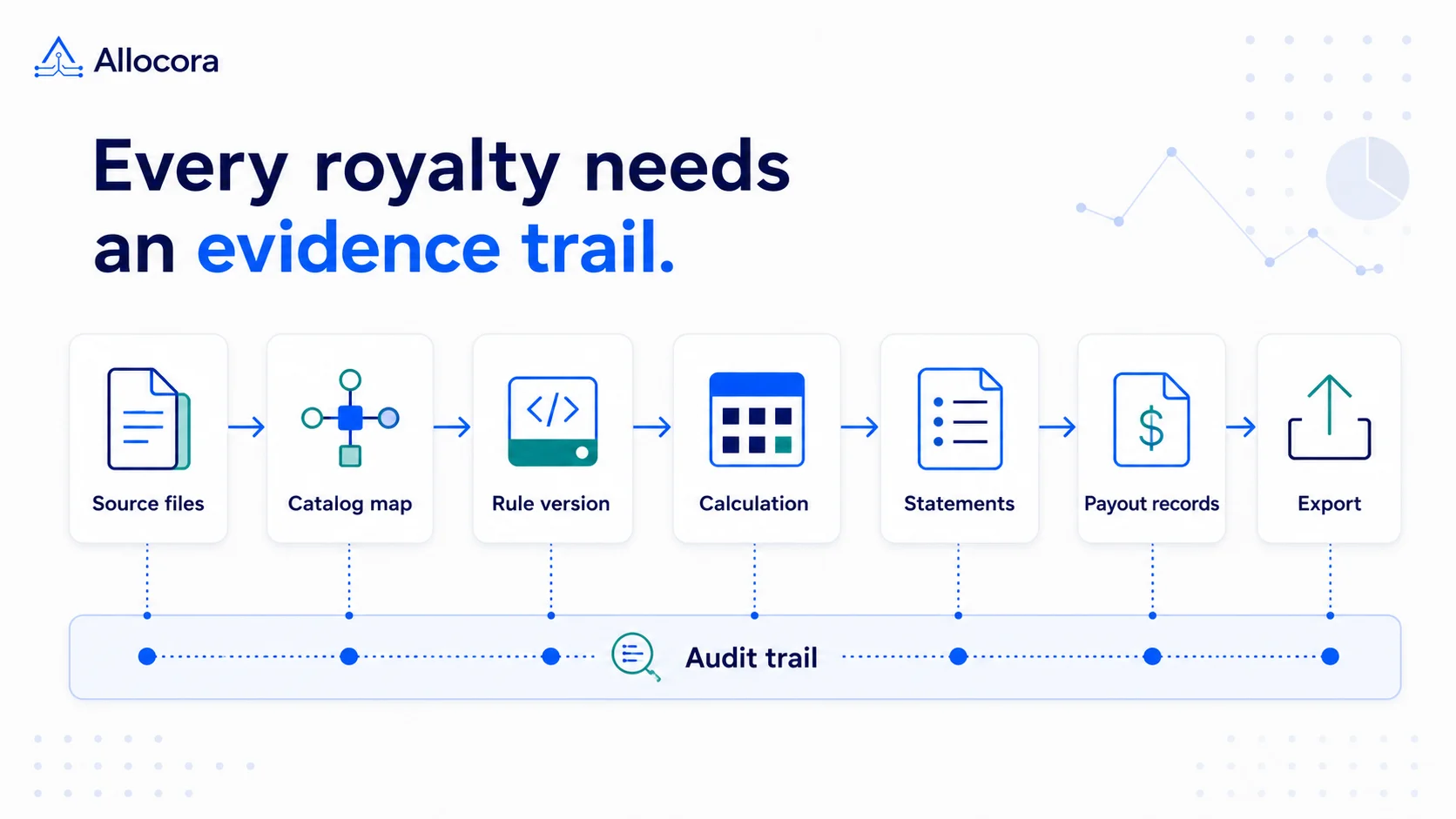 Royalty Audit Checklist: 10 Steps to Prepare Statements, Evidence, and Payout Records
A step-by-step royalty audit checklist for preparing source revenue, contract rules, statements, payout exports, and reconciliation evidence.
Aug 25, 2026 - 8 min read
Royalty Audit Checklist: 10 Steps to Prepare Statements, Evidence, and Payout Records
A step-by-step royalty audit checklist for preparing source revenue, contract rules, statements, payout exports, and reconciliation evidence.
Aug 25, 2026 - 8 min read