
Replace Spreadsheet Commission Tracking Before Month-End Breaks
A practical guide for teams whose payout spreadsheet has become too fragile for recurring close, partner disputes, and finance review.
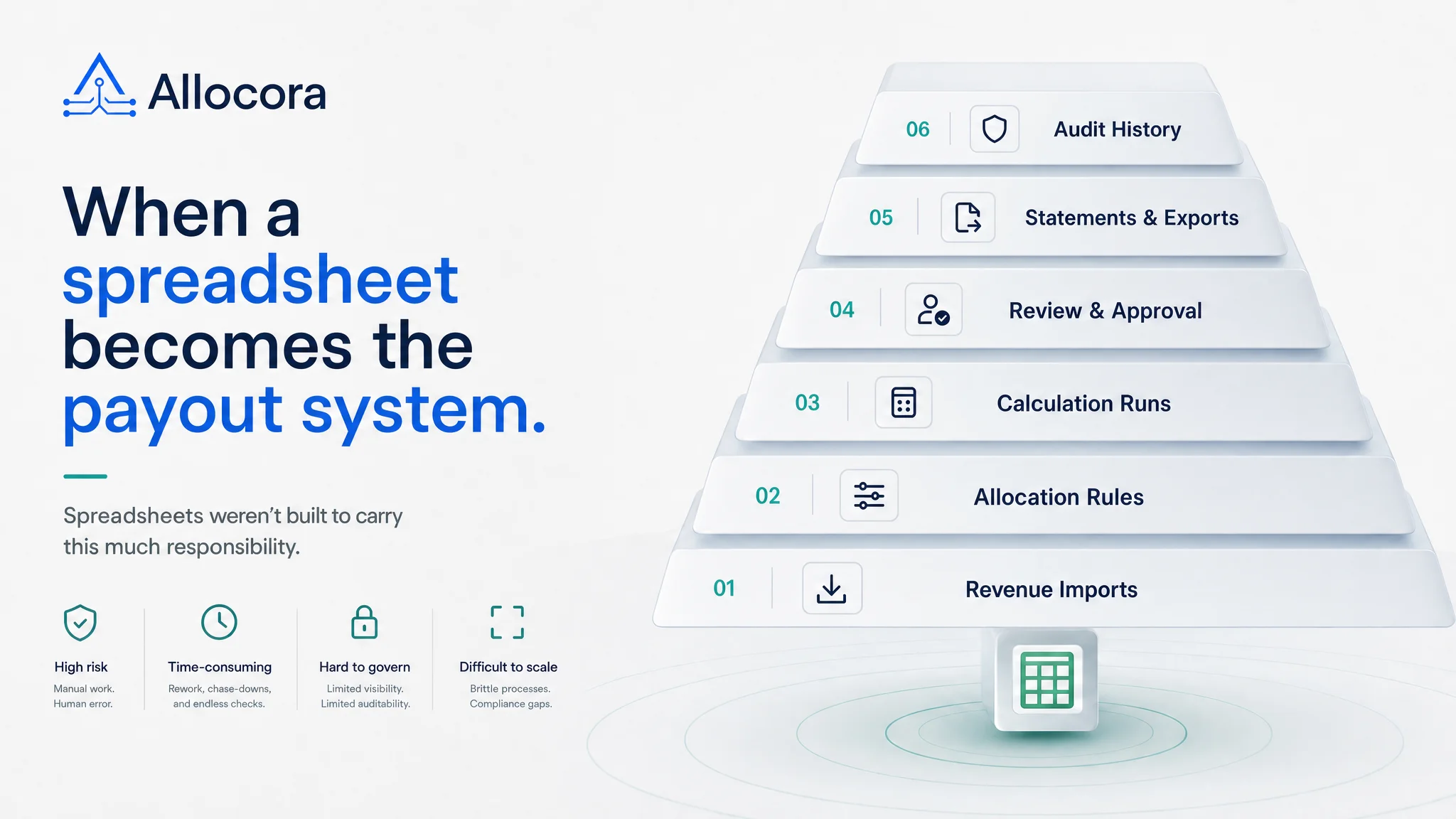
Spreadsheet commission tracking usually starts for good reasons. A team has a few payees, a few rates, and a close process that is still forming. A spreadsheet is quick, flexible, and easy to edit. For one-off analysis, it may be the right tool.
The problem is what happens when the spreadsheet becomes the payout system.
Recurring commission workflows need more than formulas. They need controlled revenue inputs, payee records, versioned rules, conflict checks, deterministic runs, statements, exports, and audit history. When those controls are missing, month-end close depends on hidden workbook logic and manual review.
Allocora's public positioning is direct: spreadsheets are flexible, but they are not a payout system. Allocora replaces spreadsheet drift with deterministic calculation runs, immutable snapshots, structured exports, and audit-ready evidence. It does not move money. It prepares the payout math before your existing payout rail or finance workflow takes over.
This guide explains when to replace spreadsheet commission tracking and what the replacement workflow should include.
The warning signs are operational, not cosmetic
You do not need to replace a commission spreadsheet because it looks messy. You need to replace it when the process around it becomes risky.
Common warning signs include:
- The same source data can produce different payout totals after formulas change.
- A partner asks how a number was calculated and the team has to reconstruct the workbook.
- Manual edits are made after close without a clear event trail.
- Product mappings are copied between tabs.
- Refunds and adjustments are tracked in separate sheets.
- Statements are copy-pasted into documents or PDFs.
- A prior period cannot be rerun with confidence.
- More than one person edits the workbook during close.
- Finance has no stable artifact to approve or lock.
These signs point to a control problem. The spreadsheet is not only storing data. It is also acting as an import tool, rule engine, calculation engine, review surface, statement generator, and audit archive.
That is too much responsibility for a workbook when payouts become recurring.
What spreadsheets are still good for
A credible replacement workflow should be honest about where spreadsheets still fit. Spreadsheets are still useful for several tasks:
- Quick ad-hoc analysis.
- Early modeling of a simple commission plan.
- Exploring a new payout idea before it becomes operational.
- One-time calculations that do not require auditability.
- Free-form notes and scenario sketches.
Allocora's comparison page makes the same point: spreadsheets are better for quick, one-off analysis that does not need auditability, free-form modeling, and immediate setup.
The problem is not that spreadsheets exist. The problem is when they remain the source of truth for recurring payout decisions.
A payout workflow needs controlled inputs
The first step away from spreadsheet commission tracking is input control. If source revenue is inconsistent, every calculation built on top of it is unstable.
In Allocora, revenue can be imported from Stripe or CSV/XLS/XLSX files. Stripe ingestion stores normalized revenue append-only and idempotent by organization, source, and external transaction ID.
This matters because a payout system should distinguish between raw upload handling and calculation logic. A spreadsheet often blends the two. Rows are pasted into one tab, transformed in another, and referenced by formulas elsewhere.
A governed workflow should instead:
- Import data through a clear source.
- Validate the required fields.
- Preserve revenue rows as immutable facts.
- Identify refunds and adjustments explicitly.
- Enforce currency rules consistently.
- Map external product identifiers to internal products.
Allocora's current implementation includes single-currency enforcement per organization, append-only revenue rows, refund and adjustment row handling, external product mapping, and calculation gating for unmapped products.
Rules should be named and versioned
In a spreadsheet, a commission rule may be a formula copied across rows. That formula might reference a rate table. It might include nested conditions. It might change by partner, product, date, or revenue source. Unless the spreadsheet is rigorously maintained, the logic becomes difficult to audit.
Commission formulas work better as named, versioned rules than hidden spreadsheet logic.
Rules in Allocora are versioned rather than overwritten. When a rule changes, the new version is separate from the old one. Historical calculations remain tied to the logic used at the time.
This is a fundamental shift:
- Spreadsheet formula: hidden inside cells.
- Governed rule: named, versioned, reviewable, and linked to calculation output.
When a partner questions a payout, the answer should not be "we think this was the formula." It should be "this rule version matched this revenue row and produced this allocation."
Simulation should replace manual spot checks
Spreadsheet review often depends on spot checks. Someone picks a few rows, recalculates them manually, and assumes the rest are correct. That approach gets weaker as the number of payees, products, and rules grows.
A replacement system should include simulation before final runs.
Allocora's rule simulation returns matched rule versions, tie-break reasoning, per-payee allocation math, metadata condition traces, and explanation payloads. It uses the shared RuleEvaluator service that calculation runs also use. This gives operators a way to test logic before the close period is finalized.
Simulation is useful when:
- Building a new commission rule.
- Changing a tier.
- Testing product-specific allocation.
- Reviewing metadata conditions.
- Checking a partner's expected allocation.
- Debugging why a rule did not match.
Replacing spreadsheet commission tracking is not only about storing rules somewhere else. It is about adding a safer review loop.
Calculation runs should become the close record
The most important replacement for a spreadsheet is a calculation run.
A calculation run should capture:
- The period.
- The selected revenue sources.
- The active rule versions.
- The product mapping snapshot.
- The revenue query.
- The line-item outputs.
- The status.
- The audit context.
Allocora's calculation run lifecycle includes input validation, source ownership checks, product mapping gates, scoped rule-conflict gates, snapshot metadata, queued execution, persisted line items, currency validation, and status transitions. Completed runs can be locked or reviewed, and statement generation is tied to locked runs.
This gives finance a clear artifact to review. Instead of asking "which workbook is final?", the team can ask "which run is locked?"
That is a better operating model.
Exports should be generated, not assembled
A spreadsheet-based close often ends with manual exports. Someone filters a tab, copies rows into a payout template, creates a PDF for each partner, and saves files into a shared folder. Each manual step creates a chance for mismatch.
Statements and exports are generated directly from calculation runs rather than assembled manually. The current functionality includes CSV/XLS/XLSX generation for calculation runs, revenue summaries, payee totals, statement summaries, product-level statements, detailed statements, and auditor bundles. Statement generation produces PDF statements from locked calculation runs.
Exports should come from the same run finance reviewed. They should not be rebuilt in a separate workbook.
Useful outputs include:
- Payee statements.
- Payout totals.
- Close packages.
- Dispute kits.
- Calculation item exports.
- Audit excerpts.
The more consistent the outputs, the less time teams spend reconciling their own files.
Audit history should cover the whole workflow
When replacing spreadsheet commission tracking, audit history is often the hidden requirement. Teams notice the need only after a partner dispute or finance review.
Allocora includes audit logging across revenue sources, revenue imports, product mappings, payees, rules, calculation lifecycle, exports, integrations, and more. This matters because errors can come from many parts of the workflow.
For example:
- A product was mapped after import.
- A rule priority changed before a run.
- A payee was toggled inactive.
- A revenue source sync failed.
- A run was approved, locked, or unlocked.
- An export was generated.
A spreadsheet may preserve none of this context unless the team manually documents it. A governed workflow should capture it as part of normal operations.
A practical migration path
Replacing spreadsheet commission tracking does not have to happen all at once. A self-serve team can move in stages:
- Identify the workbook tabs that represent real objects: sources, products, payees, rules, outputs.
- Import or connect revenue sources.
- Map products and external identifiers.
- Recreate payees.
- Convert formulas into rules.
- Use simulation to validate expected outcomes.
- Run a calculation for a known historical period.
- Compare the run output to the spreadsheet.
- Lock the run after review.
- Generate statements and exports from the locked run.
The first goal is not perfection. The first goal is to create one reproducible period that no longer depends on the workbook.
Launch takeaway
You should replace spreadsheet commission tracking when the spreadsheet becomes the payout system. That moment usually arrives when the team needs recurring close, partner statements, rule history, deterministic results, and audit evidence.
Allocora is built for that transition. It keeps the flexibility of self-serve setup while moving payout math into governed rules, deterministic runs, immutable snapshots, and structured exports.
The first step is often recognizing that the workbook has become operational infrastructure.
For the next step, explore Revenue Split Automation, review the product overview, or check the self-serve pricing.
Related Articles
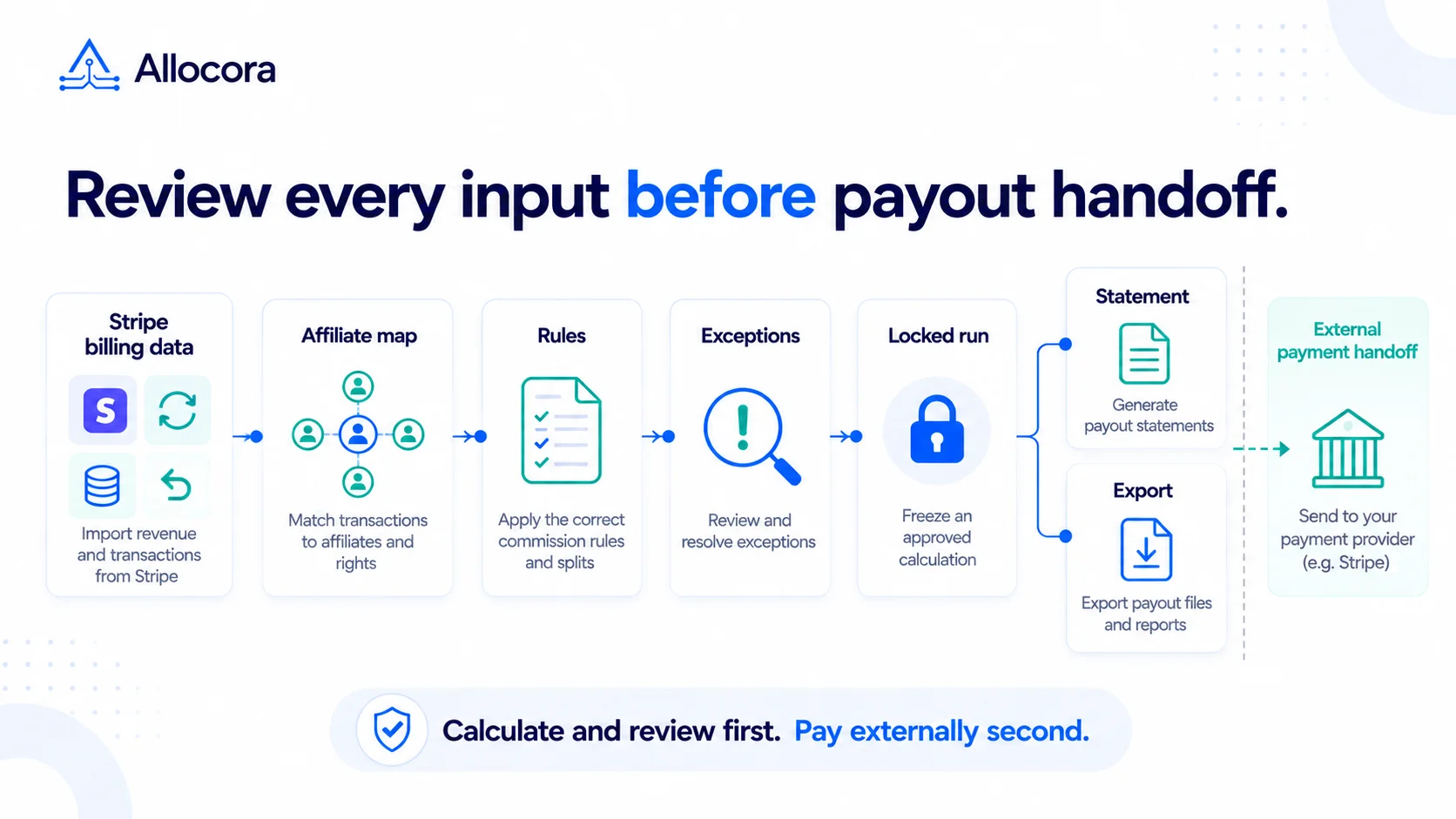 Stripe Revenue-to-Affiliate Payout Close Checklist
Review Stripe revenue for affiliate commission close: choose the ingestion path and date policy, verify mappings and corrections, lock the calculation, and prepare the external payment handoff.
Sep 24, 2026 - 6 min read
Stripe Revenue-to-Affiliate Payout Close Checklist
Review Stripe revenue for affiliate commission close: choose the ingestion path and date policy, verify mappings and corrections, lock the calculation, and prepare the external payment handoff.
Sep 24, 2026 - 6 min read
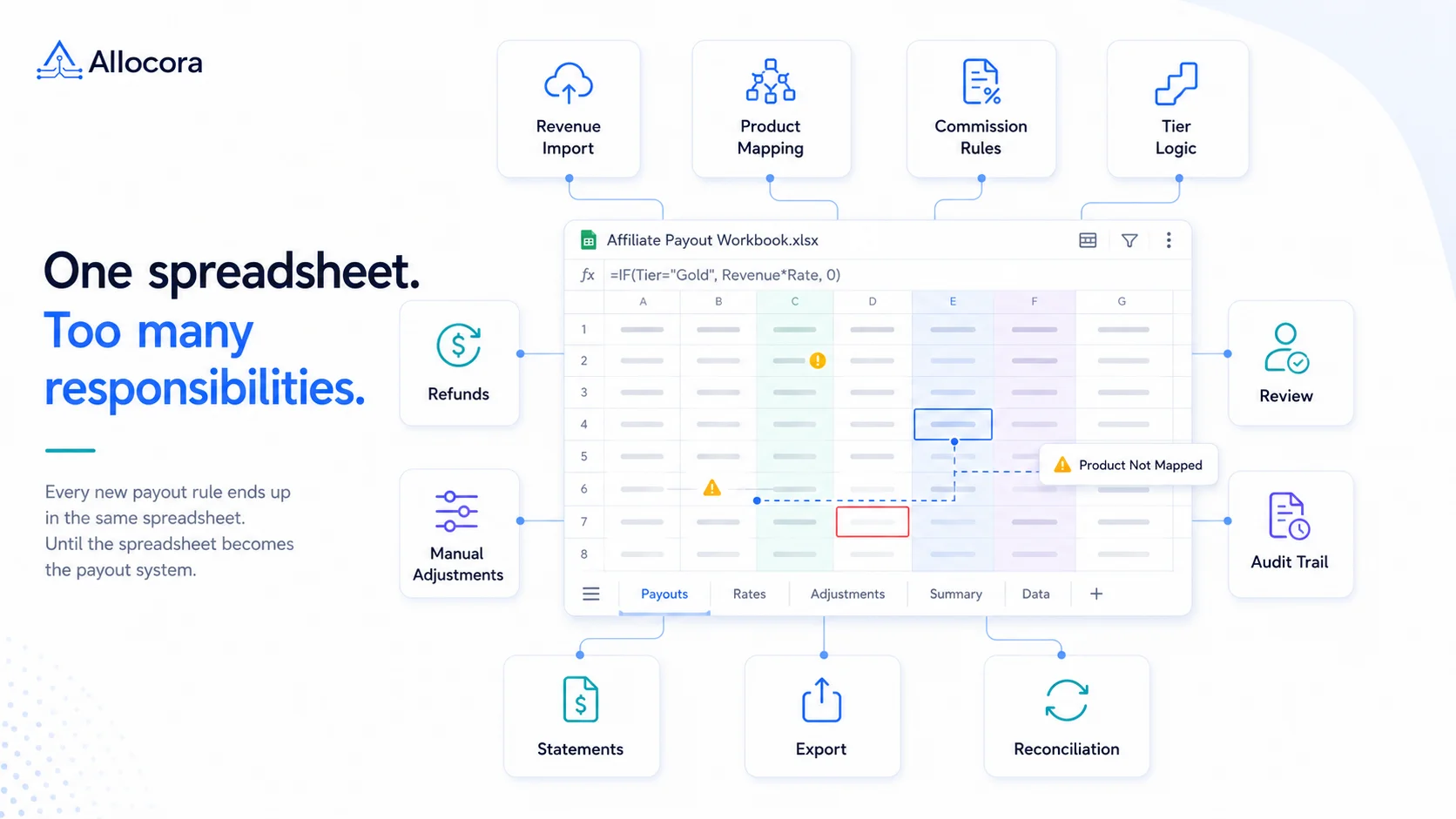 Monthly Affiliate Payout Spreadsheet: Required Fields, Controls, and Review Flow
Structure a monthly affiliate payout spreadsheet with source fields, refund adjustments, review controls, export checks, and a clear path to governed payout runs.
Jul 22, 2026 - 5 min read
Monthly Affiliate Payout Spreadsheet: Required Fields, Controls, and Review Flow
Structure a monthly affiliate payout spreadsheet with source fields, refund adjustments, review controls, export checks, and a clear path to governed payout runs.
Jul 22, 2026 - 5 min read
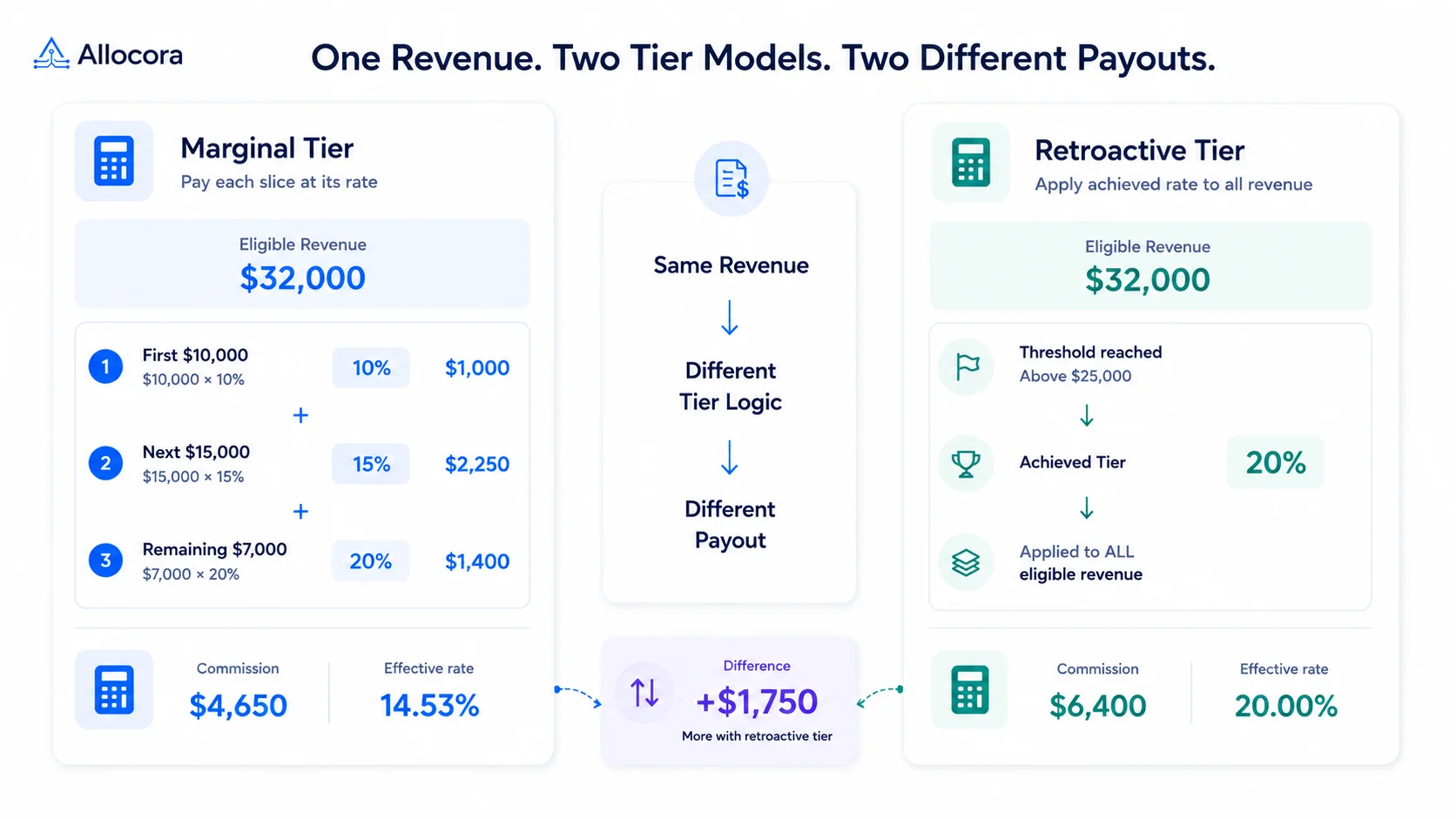 How to Calculate Tiered Affiliate Commissions Without Spreadsheet Errors
A practical guide to tiered affiliate commission math, including marginal tiers, retroactive tiers, refund holds, examples, and review controls.
Jul 16, 2026 - 6 min read
How to Calculate Tiered Affiliate Commissions Without Spreadsheet Errors
A practical guide to tiered affiliate commission math, including marginal tiers, retroactive tiers, refund holds, examples, and review controls.
Jul 16, 2026 - 6 min read