
Stripe Revenue-to-Affiliate Payout Close Checklist
Review Stripe revenue for affiliate commission close: choose the ingestion path and date policy, verify mappings and corrections, lock the calculation, and prepare the external payment handoff.
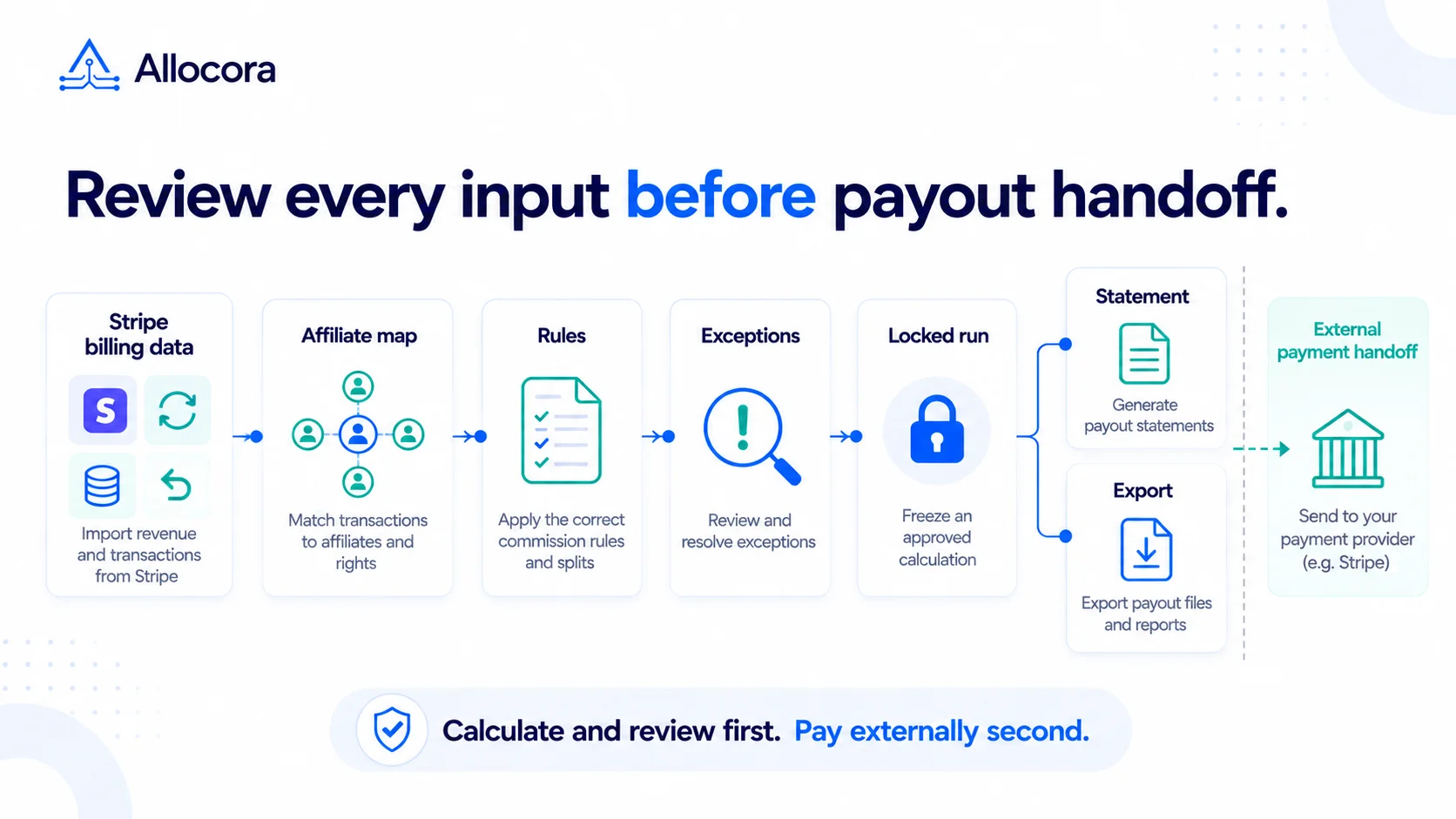
Stripe can supply billing context for SaaS affiliate commission calculations. Your affiliate agreement still defines which revenue is eligible, who earns a commission, and how corrections are handled.
This is a revenue-to-affiliate close checklist, not a guide to creating Stripe Payout objects. Stripe uses Payout for a separate funds-transfer resource. Use Stripe affiliate commission automation as the broader workflow reference.
Quick answer
Choose a native-sync or file-import workflow; confirm its revenue basis and date policy; preserve the billing and affiliate identifiers needed for review; apply commission rules; review exceptions; lock the calculation run; then prepare the external payment handoff. Reconcile payment confirmations after execution outside Allocora.
Stripe and affiliate context to collect
Start with source records, not a typed payout total. Collect the context required by your agreement and retain the relationship to the original Stripe objects.
| Stripe context | Why it matters |
|---|---|
| Balance transaction ID and related Stripe source ID, where available | Traceability to the synced revenue event |
| Invoice ID, where applicable | Billing-event review |
| Customer ID | Customer-level review |
| Subscription ID, where applicable | Recurring commission eligibility |
| Product and price IDs | Product-specific rates |
| Policy-defined event date | Period eligibility |
| Amount basis and currency | Consistent commission inputs |
| Refund or credit-note ID and related payment or invoice | Correction lineage |
| Referral identifier and its source | Affiliate mapping |
These are review inputs, not a promise that every field is present on every synced record. Inspect the available context and collect missing policy-critical evidence separately. If a referral identifier comes from metadata, a coupon mapping, a referral platform, or a separate mapping file, preserve that source as well as the resolved affiliate.
Choose the ingestion path and commission date
Allocora's documented native Stripe workflow starts from balance transactions and preserves related billing identifiers when available. Native Stripe sync uses the Balance Transaction creation timestamp as occurred_at when Stripe supplies it; it is not a selector among invoice-paid dates and subscription service periods. Check the synced records and source settings before using this path for an agreement with a different timing policy.
For a file-based workflow, prepare eligible revenue facts and use one policy-defined date consistently. Stripe exposes invoice status_transitions.finalized_at and status_transitions.paid_at. Service periods belong to invoice line items as period.start and period.end, not the invoice-level period fields. See the Invoice object and Invoice Line Item object.
Do not mix date policies across rows. If the agreement pays only after successful payment, verify the payment evidence; a finalized but unpaid invoice is not eligible under that policy. If your policy instead relies on revenue-recognition data, confirm that the required data is available and have finance approve the mapping.
For either path, document whether the commission base uses gross revenue, revenue after processor fees, or another contract-defined amount. Do not import already-calculated commissions as revenue to be allocated again, or load the same events through both paths without a duplicate review.
Map affiliates before calculating
Affiliate mapping should happen before the commission formula runs. Review:
- Missing referral metadata.
- Duplicate affiliate IDs.
- Inactive partners.
- Customers reassigned between affiliates.
- Coupon codes that no longer map cleanly.
- Partner records on hold.
Resolve unknown affiliate identities before including those obligations in a payment handoff. Do not use a default rule as a substitute for unresolved identity; document any intentional fallback allocation separately.
Review product and plan rules
If your SaaS affiliate program uses different rates by product, plan, or billing interval, check:
- New Stripe products created during the period.
- New prices under an existing product.
- Annual plans versus monthly plans.
- Add-ons and setup fees.
- Excluded services.
- Coupons and discounts.
If a plan has no explicit rule, review its treatment before approval. An intended default allocation must match the agreement; it should not silently stand in for missing terms.
Handle refunds and churn
A Stripe Refund references a Charge or PaymentIntent. Preserve the related invoice evidence when the agreement requires it. A Credit Note references an Invoice. Keep these relationships distinct when tracing a correction back to the earning event.
Document whether the agreement calls for refunds to:
- Reduce the current-period payout.
- Create a correction linked to the original earning period.
- Create a carried clawback balance.
- Be accounted for against a holdback reserve.
These are policy choices, not interchangeable system actions. Retain the original locked run. For an eligible correction within the same period and source scope, use Adjustment Run and record a correction note. Review the recalculated result and the Adjustment Delta exports before preparing a new payment handoff. Refunds dated outside the original period are not included by recalculating that period. Have the program owner and finance reviewer approve the treatment before payment.
Churn and cancellation timing should also be explicit. State whether eligibility continues only while the customer is active, applies to the first invoice, or follows another defined agreement term.
Calculation and review flow
A controlled close looks like this:
- Choose native Stripe sync or a file-based revenue import, and document the date and amount basis.
- Inspect source coverage, skipped events, and missing policy-critical context.
- Resolve affiliate and product mappings and document intentional fallback treatment.
- Apply commission rules.
- Review exceptions, refunds, adjustments, and payment holds.
- Complete the required review or approval, then lock the calculation run.
- Generate statements and prepare the selected export template for the payment handoff.
- Execute payments outside Allocora.
- Reconcile confirmations against the locked expected obligations.
Use Allocora vs Stripe Connect to distinguish calculation governance from payment infrastructure.
What not to do
Avoid these shortcuts:
- Paying from a manually filtered Stripe CSV without review evidence.
- Losing subscription IDs after aggregation when eligibility depends on them.
- Ignoring refunds until a partner complains.
- Applying one rate to all products when the agreement requires different rates.
- Exporting a payment handoff before the run is locked.
Stripe billing data is an input to the commission process; it does not by itself establish the affiliate agreement or complete the close review.
Final approval checklist
Before creating the payment handoff, confirm:
- Source coverage for the close period has been reconciled, including excluded or skipped events.
- Affiliate and product mappings, including any intentional fallback, match the agreement.
- Refund and credit-note treatment is documented and traceable.
- The retained run-wide Dispute Kit includes the run’s recorded rule versions and line-item traces identifying the applied rule version or fallback treatment; where a linked refund reverses a recorded original allocation, its trace retains references to that allocation.
- Statement payable totals reconcile with the payment handoff after documented holds and exclusions.
- The selected export template contains the identifiers required by the downstream process. Add a statement reference explicitly when needed; do not assume every preset includes it.
For teams still using spreadsheets, read Allocora vs spreadsheets to evaluate how reviewed runs and retained evidence would fit the close process.
Related Articles
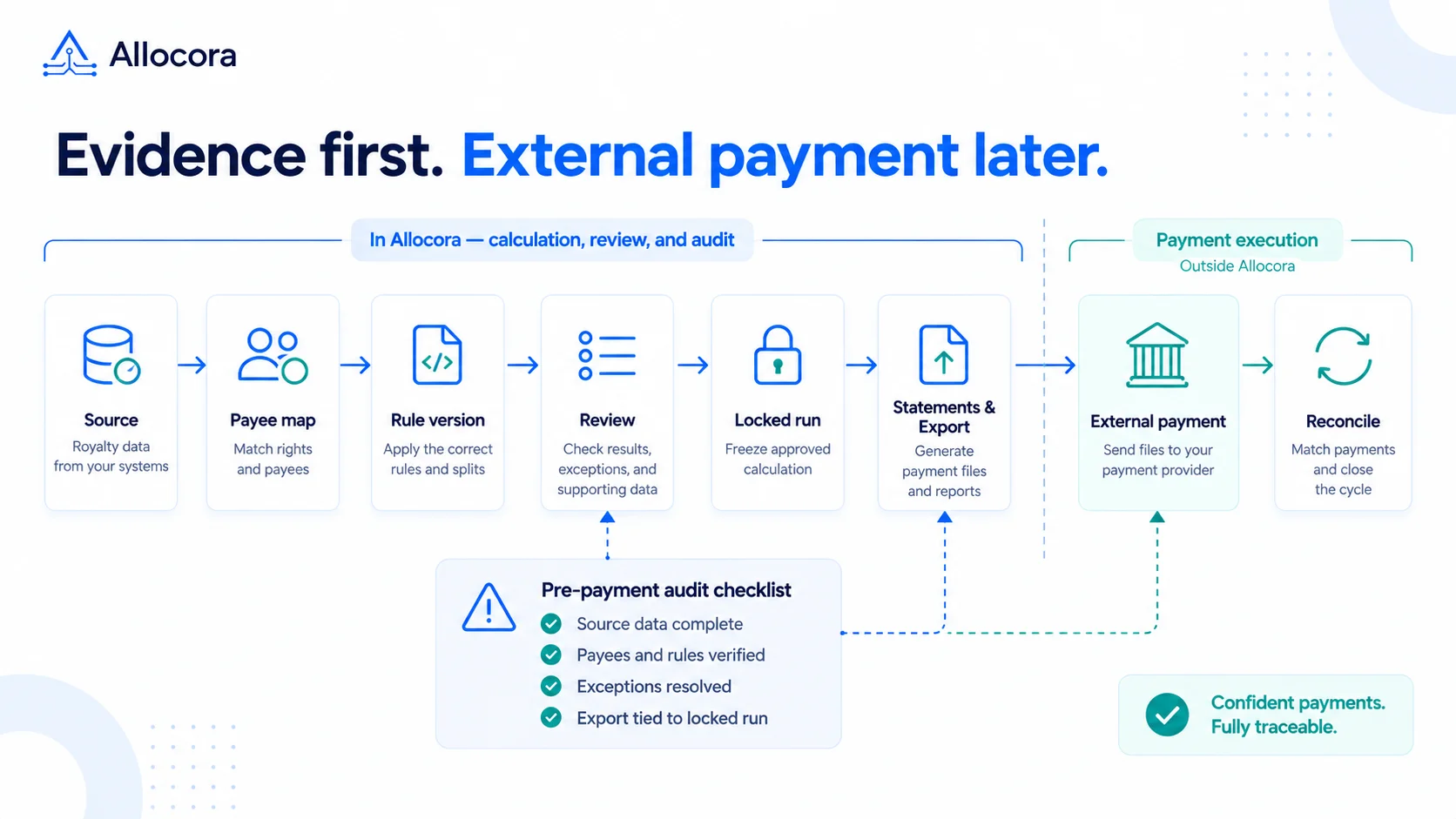 Payout Audit Checklist: What to Review Before External Payments
A payout audit checklist for reviewing source data, mappings, rules, locked runs, statements, exports, and reconciliation before external payments.
Sep 16, 2026 - 7 min read
Payout Audit Checklist: What to Review Before External Payments
A payout audit checklist for reviewing source data, mappings, rules, locked runs, statements, exports, and reconciliation before external payments.
Sep 16, 2026 - 7 min read
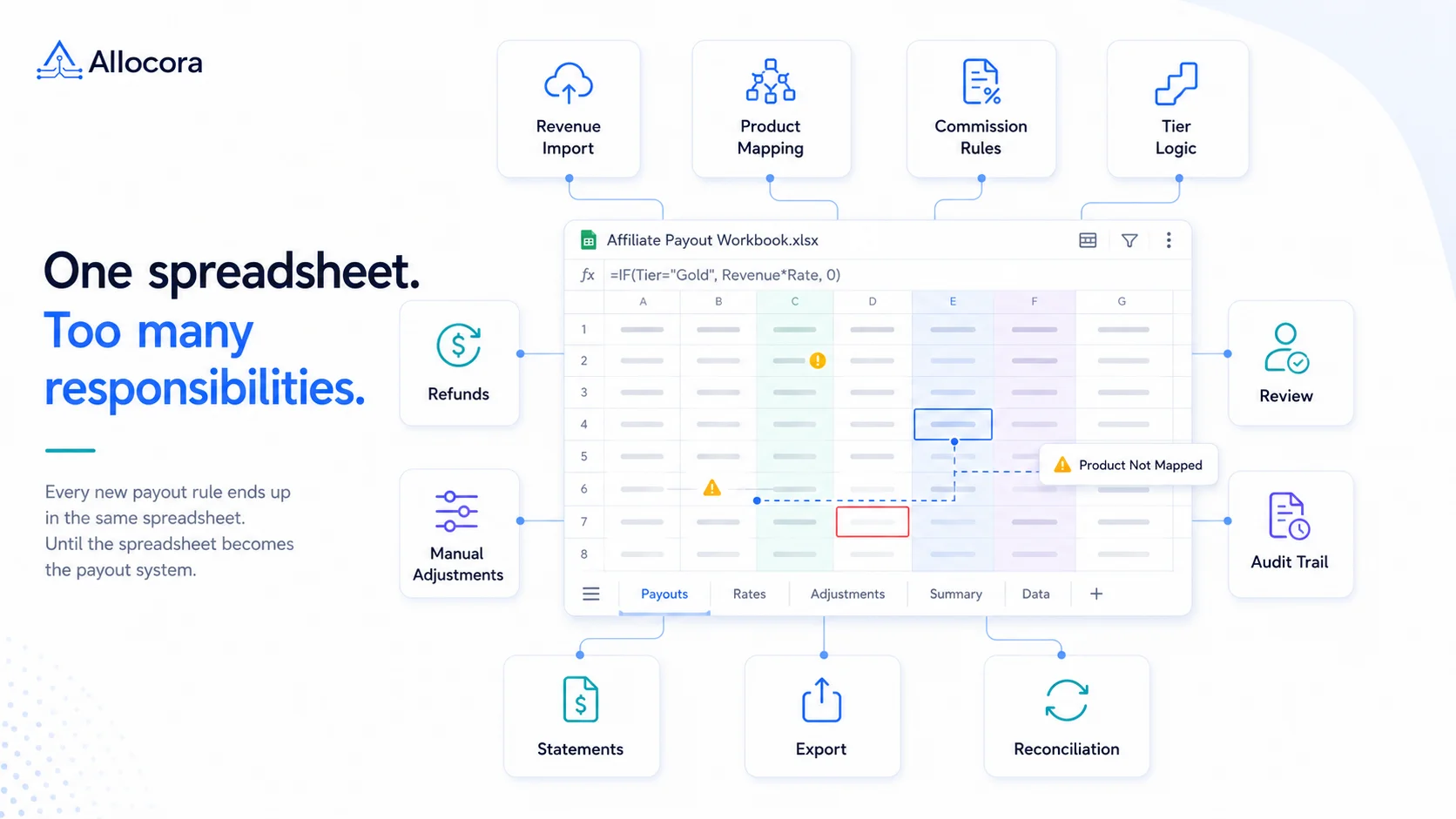 Monthly Affiliate Payout Spreadsheet: Required Fields, Controls, and Review Flow
Structure a monthly affiliate payout spreadsheet with source fields, refund adjustments, review controls, export checks, and a clear path to governed payout runs.
Jul 22, 2026 - 5 min read
Monthly Affiliate Payout Spreadsheet: Required Fields, Controls, and Review Flow
Structure a monthly affiliate payout spreadsheet with source fields, refund adjustments, review controls, export checks, and a clear path to governed payout runs.
Jul 22, 2026 - 5 min read
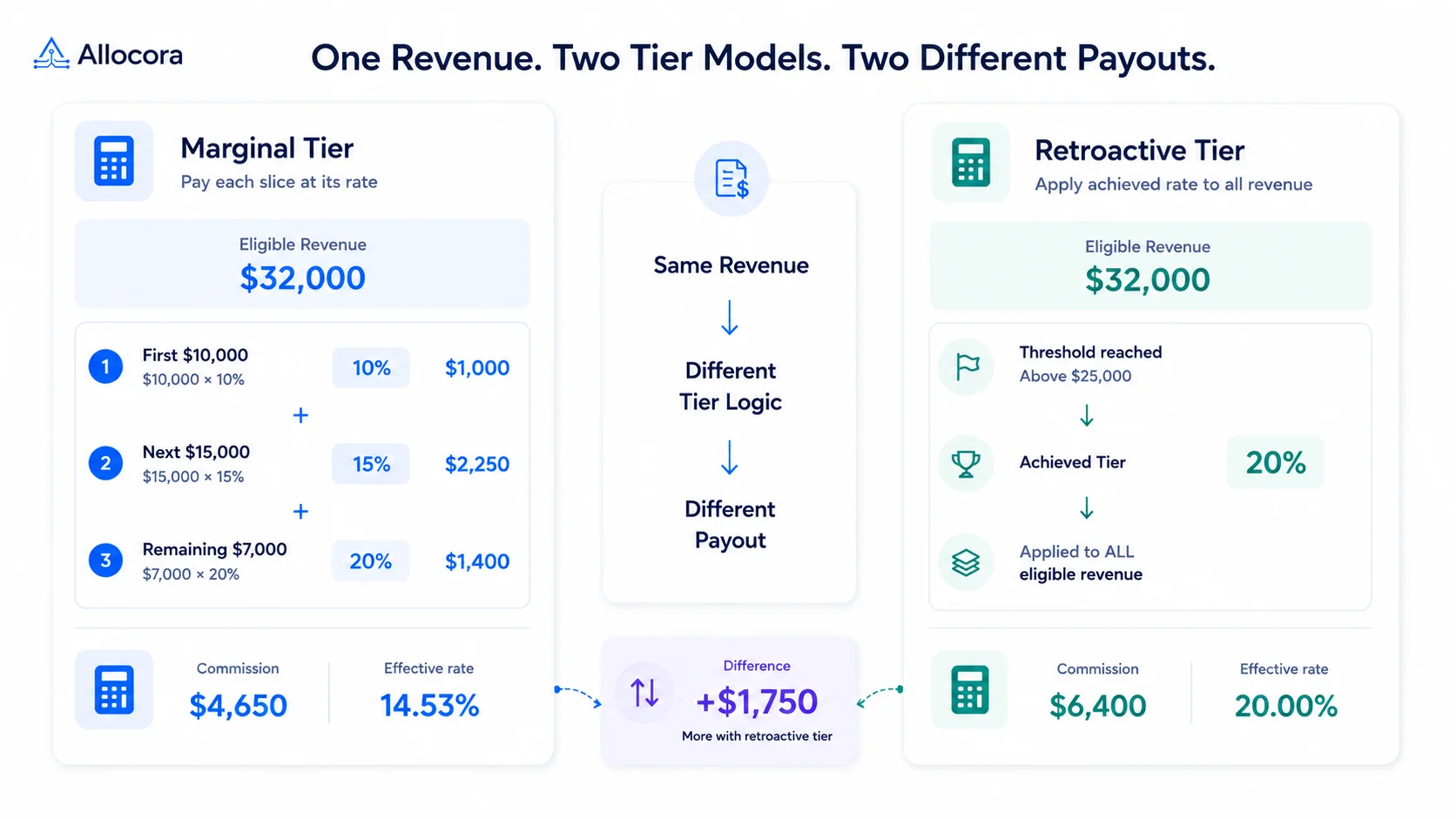 How to Calculate Tiered Affiliate Commissions Without Spreadsheet Errors
A practical guide to tiered affiliate commission math, including marginal tiers, retroactive tiers, refund holds, examples, and review controls.
Jul 16, 2026 - 6 min read
How to Calculate Tiered Affiliate Commissions Without Spreadsheet Errors
A practical guide to tiered affiliate commission math, including marginal tiers, retroactive tiers, refund holds, examples, and review controls.
Jul 16, 2026 - 6 min read