When a book contract pays a percentage of the retail price, each sale's royalty is the units sold, times the retail price before tax that applied on the sale date, times the royalty rate that applied then. The money you actually received is recorded separately. When a reader returns copies, you reverse the royalty with the price and rate of the original sale, not with today's terms.
Two events make this harder than one formula: the retail price changes, and returns arrive in a later period. This guide works one title through both, shows the numbers a spreadsheet can get wrong, and then sets up the same calculation in Allocora.
The title, prices, rates, and amounts below are illustrative. They are not standard publishing terms or advice on a particular contract.
The example: one title, a price change, and a return
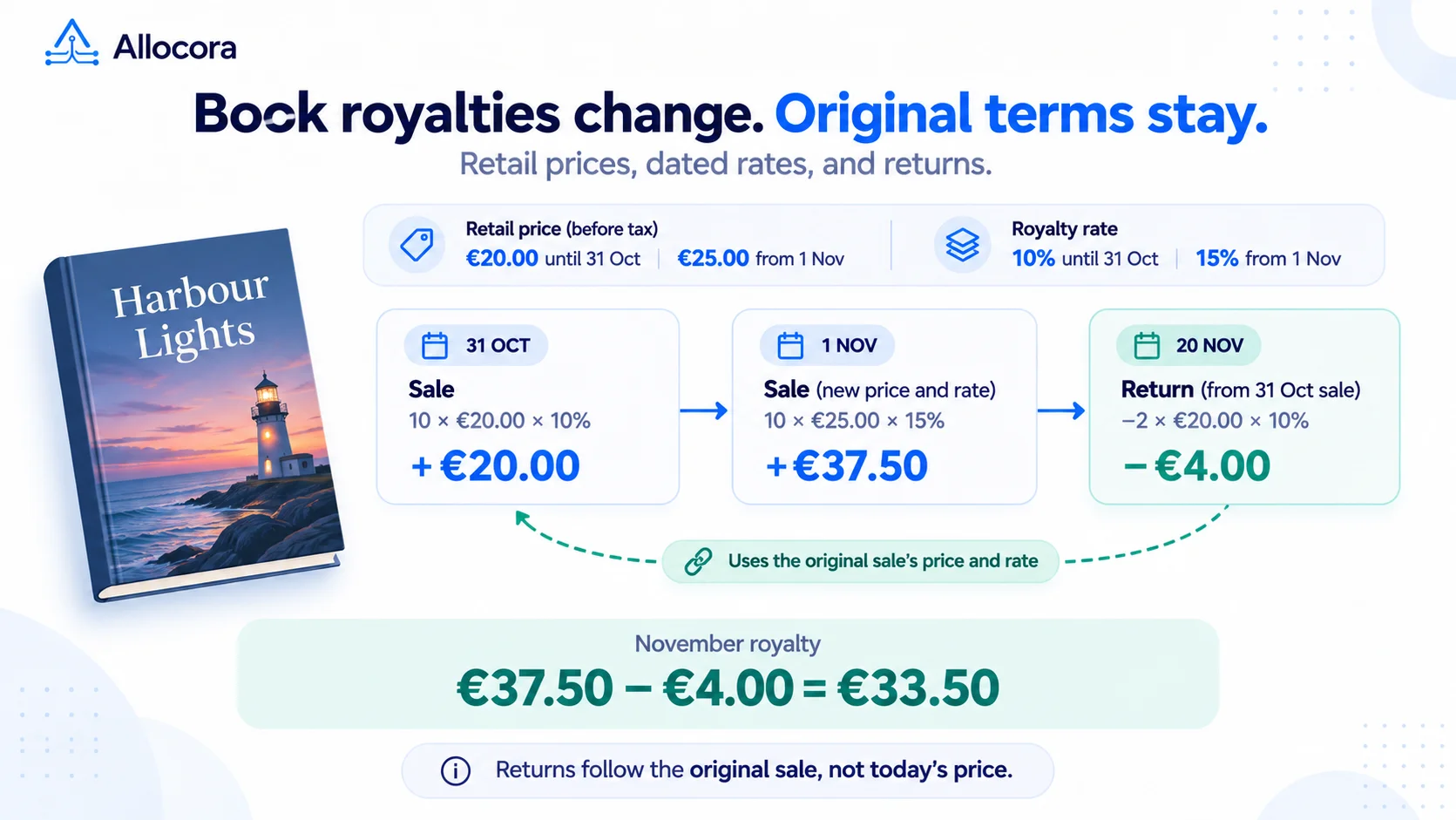
A publisher pays the author of Harbour Lights, a paperback, a royalty on the retail price before tax. All amounts are in EUR.
| Contract term | Until 31 October | From 1 November |
|---|---|---|
| Retail price before tax | €20.00 | €25.00 |
| Author royalty rate | 10% | 15% |
The distributor reports three events:
| Date | Event | Units | Money received |
|---|---|---|---|
| 31 October | Sale | 10 | €80.00 |
| 1 November | Sale | 10 | €100.00 |
| 20 November | Return of copies from the 31 October sale | 2 | −€16.00 |
The money received is lower than the retail price because the retailer and distributor keep a discount. Under a retail-price contract, that discount does not reduce the author's royalty.
Step 1: Use the price and rate in force on each sale date
Royalty = units sold × retail price before tax on the sale date × royalty rate| Sale | Calculation | Royalty |
|---|---|---|
| 31 October | 10 × €20.00 × 10% | €20.00 |
| 1 November | 10 × €25.00 × 15% | €37.50 |
The two sales are one day apart, but the October sale still uses the October price and rate. A worksheet that uses the current price and royalty rate for the whole quarter would calculate €37.50 for both sales.
Keep the €80.00 and €100.00 as the revenue of each sale. They are the amounts to reconcile with the distributor and your bank. They are not the base for this royalty: 10% of €80.00 would pay the author €8.00 instead of €20.00.
For other royalty calculation methods, including net receipts, coauthor splits, and advances, see How to Calculate Book Royalties for Publishers.
Step 2: Reverse a return at the original sale's terms
On 20 November, two copies from the 31 October sale come back. Each copy earned the author 10% of €20.00. The return reverses exactly that:
Reversal = −(returned units × original retail price × original rate)
         = −(2 × €20.00 × 10%) = −€4.00
Two other calculations look reasonable in a November worksheet, and both are wrong:
| Method | Calculation | Reversal | Result |
|---|---|---|---|
| Original sale's price and rate | 2 × €20.00 × 10% | −€4.00 | Reverses what those copies earned |
| Current price and rate | 2 × €25.00 × 15% | −€7.50 | Takes back €3.50 more than was paid |
| Rate applied to the refunded money | €16.00 × 10% | −€1.60 | Leaves €2.40 of royalty on returned copies |
To apply the right terms, the return needs a reference to the sale it came from and the number of units returned. The refunded money alone does not tell you which price and rate applied.
The author's November royalty is the new sale minus the return:
€37.50 − €4.00 = €33.50If the remaining eight October copies are returned later, they reverse the other €16.00, and the October sale's royalty is back to zero. Returns of one sale can never reverse more units than were sold.
Step 3: Check the royalties against the money received
A retail-price royalty does not fall when the discount grows. On a deeply discounted sale, the royalties can exceed what you received. Suppose ten copies are sold in November as a remainder for €30.00:
Author royalty = 10 × €25.00 × 15% = €37.50
Money received = €30.00
The royalty is €7.50 more than the sale brought in. Add every royalty due on the sale, including other payees such as an illustrator or a translator, and compare the total with the money received. If the total is higher, check how the contract treats such sales before you pay it.
Calculate the same example in Allocora
Allocora calculates retail-price royalties from units and a retail price, while the money you received stays the revenue amount of each sale.
1. Choose where the price comes from
In the rule's allocation, set Royalty base to one of two options:
- Retail price × units, price from file uses the retail price on each sale row of your revenue file. Choose it when your distributor's report includes the price.
- Retail price × units, price from product uses the dated prices you keep on the product. Choose it when the contract price is yours to maintain.
For this example, open the product, go to Retail prices, and add €20.00 starting on 1 January and €25.00 starting on 1 November. Each price applies from its start date until the next one, and each sale is matched by its UTC date. When you edit the prices later, Allocora preserves the historical price entries, and reviewed calculations retain the prices used for those results.
Allocora uses only the source you choose. If a sale has no price there, the calculation stops and names the sale. It does not fall back to the other source.
Put the 10% rate on a rule whose Last active day is 31 October, and the 15% rate on a rule Effective from 1 November. Retail-price royalties use a flat rate.
2. Import units, receipts, and the link to the original sale
In the revenue file, keep the amount column as the money received and add:
| Column | Meaning |
|---|---|
| Units | Copies sold or returned. A return may show negative units. |
| Retail Price Without Tax | The price per copy, when the rule takes the price from the file. |
| Original Revenue ID or Original External ID | The sale that a return reverses. |
The revenue file columns reference explains each column, and the Retail-price book sales export template suggests these mappings when you import.
3. Lock the sale's period before calculating its return
Allocora reverses a return with the price and rate of its original sale, so the sale must already be in a locked calculation. In this example, calculate and lock October, then calculate November. If a return falls in the same period as its sale, the calculation stops; lock a period that ends before the return date first.
When the November calculation runs, it shows €37.50 for the new sale and −€4.00 for the return. Expand a line in the calculation's items to see the units, retail price, and rate behind it, next to the revenue amount you received.
A later price change on the product does not alter a calculation that has already been reviewed, and a locked sale cannot be unlocked or recalculated while a locked return depends on it.
4. Check when royalties exceed receipts
If the royalties on one sale, across all payees and rules, add up to more than its receipts, Allocora stops the calculation. For the remainder sale above, the author's €37.50 exceeds the €30.00 received. First verify the source data and contract terms. If the figures are correct and the agreement still requires €37.50, do not change a valid rate simply to bypass the check. Resolve how to handle this exception before issuing the statement.
5. Show the author how each royalty was calculated
The product statement prints a line under each retail-price royalty with the units, the retail price before tax, and the rate. For the November sale, the author reads "Retail price royalty: units 10 × price before tax €25.00 × 15.00%" next to the €37.50, and the return shows "units returned 2 × price before tax €20.00 × 10.00%" next to the −€4.00. The revenue column still shows the money you received, so the author sees both figures.